

Stock Preparer
ANALYZE STOCK ARTWORK, LOCATE TECHNICAL RISKS, AND AUTOMATE SELECTED PREPARATION WORK.
Find common stock-delivery problems before export and correct repetitive issues with controlled actions.
Stock Preparer scans the active artboard or all artboards and reports live text, raster and linked images, open paths, strokes, patterns, symbols, boundary issues, hidden or locked content, and shifted full-artboard backgrounds. Use the report to select problem objects in Illustrator, then run only the preparation actions you approve.
The document is changed in memory and is never saved automatically.

INDIVIDUAL LICENSE
1 USER up to 2 DEVICES

TEAM LICENSE
UP TO 10 USERS
How to use — Stock Preparer
OPEN DOCUMENT
Stock Preparer scans the active artboard or all artboards.
Open a Illustrator document. Choose File > Scripts > Other Script… and select Stock Preparer.jsx. If permanently installed, choose File > Scripts > Stock Preparer.
ANALYZE AND LOCATE PROBLEMS
- Choose Active artboard or All artboards.
- Click ANALYZE.
- Select an artboard and one of the 12 issue categories.
- Click SELECT OBJECTS IN ILLUSTRATOR.
PREPARE DOCUMENT
- Run ANALYZE and review the report first.
- Choose the required actions: outline text, expand strokes, clean stray objects, align backgrounds, or adjust artboards.
- Click PREPARE DOCUMENT and confirm.
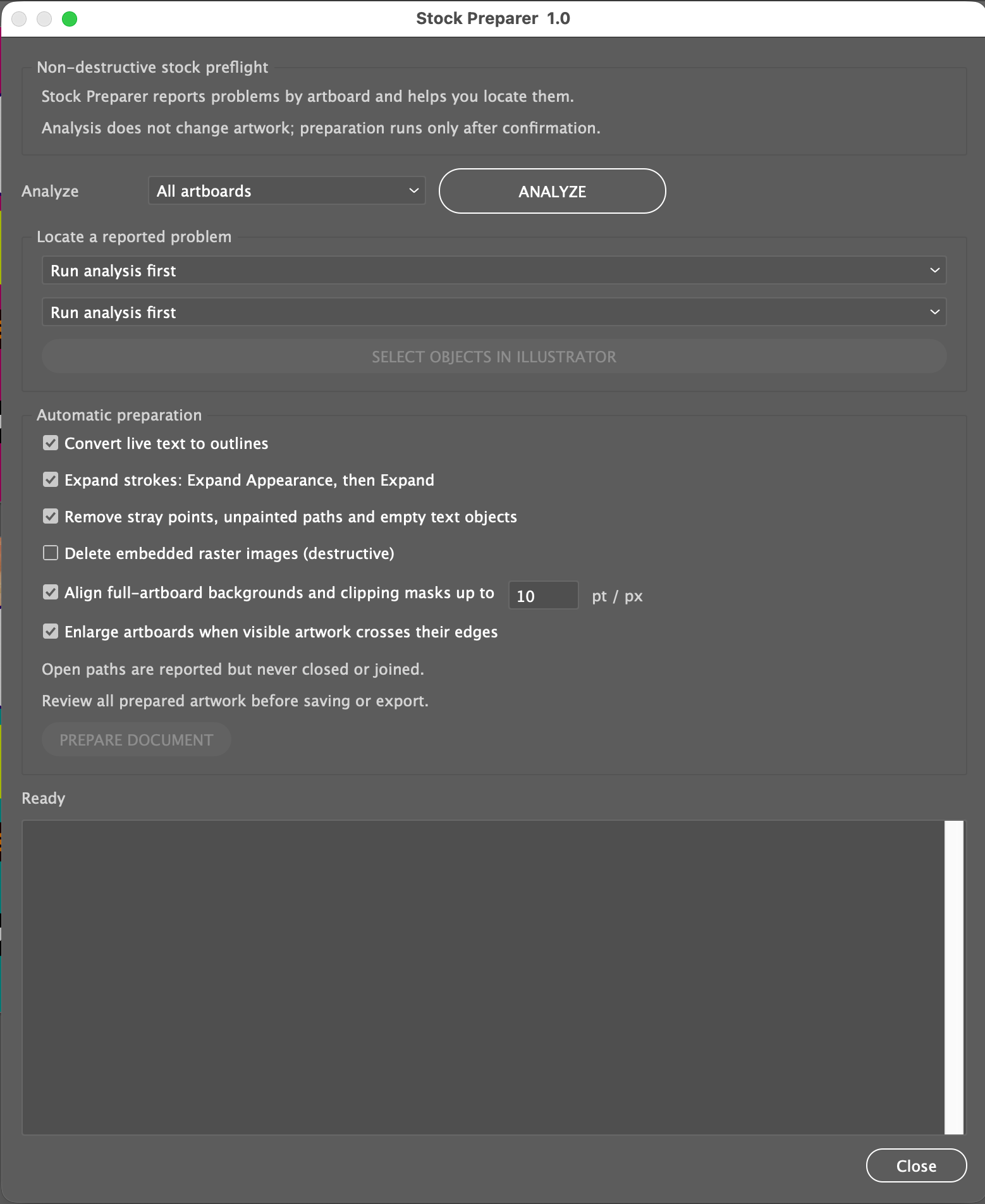
NO MORE HUNTING FOR TECHNICAL PROBLEMS ACROSS THE WHOLE DOCUMENT.
RESULT 1 — The reported objects are selected for direct inspection without searching the whole document.
RESULT 2 — Selected preparation actions run, a summary is shown, and the unsaved document remains open for review.
HOW STOCK PREPARER WORKS
- Choose Active artboard or All artboards and click ANALYZE.
- Read the report and locate objects by artboard and category.
- Select only the automatic actions you need.
- Click PREPARE DOCUMENT and review the summary.
- Re-analyze if needed and save under a new name only after inspection.
REQUIREMENTS
- Adobe Illustrator 2025, 2026
- macOS or Windows
- Visible, unlocked items when they must be selected or modified.
- Operating-system compatibility is not stated in the source guide.
IMPORTANT TO KNOW
- Text outlining removes editability; stroke expansion can change complex appearances.
- Embedded-raster deletion is destructive and off by default.
- RGB mode is reported but not converted automatically.
- Open paths, linked images, patterns, symbols, hidden items, and locked items are reported but not automatically resolved.
- Stock Preparer does not check legal rights, metadata, marketplace policy, or visual quality.
- The result is not saved automatically and does not guarantee marketplace acceptance.
INCLUDED WITH STOCK PREPARER
- Stock Preparer.jsx
- README.txt
- QUICK_START.pdf
- Full User Guide
- PACKAGE_CONTENTS.txt
- IMPORTANT-DO-NOT-EDIT.txt